Huntsman V2 Analog Honest Review — Is the Hype Justified?
Category: Electronics
Introduction
I've been using the Razer Huntsman V2 Analog for several months now as my daily-driver keyboard for both work and gaming. I bought it because the analog switch concept sounded genuinely useful—being able to fine-tune actuation points and get analog input from individual keys promised a blend of precision for gaming and comfort for typing. What I found was a keyboard that delivers on some of that promise spectacularly, while falling short of perfection in other, very practical ways. This is my honest, first-person take on the Huntsman V2 Analog: what I loved, what frustrated me, and whether the hype is actually justified for most people.
What I tested it on
My primary setup is a desktop PC used for office work, content creation, and a mix of competitive and casual gaming (FPS, racing sims, and a few single-player RPGs). I tested the keyboard across daily typing tasks, long writing sessions, multiplayer matches, and longer racing-sim sessions where the analog input was most relevant. I ran the keyboard with Razer's software for the duration to explore customization and fine-tuning.
Design & Build
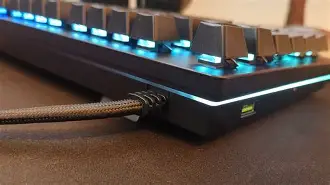
Out of the box the Huntsman V2 Analog feels solid. The frame is weighty enough to stay put on the desk without sliding, and the brushed finish around the bezel looks clean without being flashy. The keyboard has a substantial, premium feel—I wasn't worried about flex when pressing the board hard. It uses a detachable USB-C cable, which is convenient for transport and cable management.
I appreciated the keycap profile: they felt comfortable for long typing sessions and had just enough texture to avoid slippery fingers. I won't claim they're the thickest PBT keycaps I've ever used, but they felt noticeably better than many generic caps I've had on cheaper boards. Stabilizers on larger keys were decent, with only a small amount of rattle after several months; I did try a small bit of stabling lubrication to reduce a light ping on the spacebar.
Physical controls and extras
The media controls and the volume control (wheel/dial) are convenient for quick adjustments. In the heat of a match or while editing audio, being able to reach up and turn a volume wheel without alt-tabbing has been a subtle but meaningful convenience. The keyboard's RGB is per-key and customizable via software; in practice I used mostly subtle lighting profiles rather than full-on disco.
Switches & Typing Feel
The core selling point here is Razer's analog optical switches. In my experience, these switches provide a smooth linear travel with low friction and a responsive bottom-out. What makes them unique is twofold: first, you can customize the actuation point to be shallower or deeper depending on the task; second, the switches can detect variable key travel for analog input (useful in racing games for throttle/brake and other applications).
For typing, I normally set the actuation to a slightly shallower point than factory defaults. What I found was quicker key presses and fewer accidental multi-presses, and my typing speed stayed consistent. The switches are not clicky—this is a linear experience—so if you prefer tactile or clicky switches you won't get that here. I personally liked the firmness and the way each press felt decisive without being harsh.
Discover deals on Electronics — updated daily.
View Offers →That said, the analog capability doesn't materially change day-to-day typing. For writing and spreadsheets the analog detection is mostly idle; it's a feature you engage for certain games or creative applications. But having the option to tune actuation does mean I could tune the keyboard separately for long typing sessions and for short, competitive gaming bursts.
Gaming & Analog Functionality
This is where the Huntsman V2 Analog aims to distinguish itself. For racing sims, I mapped throttle and braking to keys that would normally be digital (W/S or other keys) and used analog sensing to get granular control. It worked—steering and throttle modulation felt more natural than using on/off key presses. In racing sessions I noticed fewer jerks and more subtle control, particularly when I didn't have a full wheel/pedal setup available.
For FPS and competitive gaming, the benefit is more nuanced. Being able to set shallower actuation allowed faster responses for strafe or sprint keybinds, and the toggle between shallow and deep actuation could be a real advantage if you switched roles often. That said, the advantage was marginal against a skilled opponent using a high-quality mechanical keyboard with conventional switches. Analog input did not make me a dramatically better player overnight, but it did give me a modest edge in certain sequences where partial inputs mattered (e.g., walking vs. running transitions in stealth segments).
A practical note: the analog features require software setup (Razer Synapse). In my experience the software is capable but sometimes bloated. It does allow per-key actuation mapping and macros, and I appreciated the presets for analog-on-specific keys. However, I sometimes wished for easier cloud-syncing and simpler profile switching for different machines.
Software & Customization
Razer's Synapse software is the essential companion to unlock the Huntsman V2 Analog's feature set. In my experience, Synapse lets you:
- Adjust actuation points per key
- Enable per-key analog detection and map analog output to game controls
- Create macros and multiple profiles
- Customize per-key RGB with Chroma effects
Setting up analog keys took a few tries to get the sensitivity feeling natural, but once dialed in I saved profiles for "Typing," "FPS," and "Racing." My frustration was with the software's occasional slow startup and the need to log in to a cloud account for certain features. If you want a purely local, minimal software experience, this might be a drawback. For me, the customization was worth it, but I recognize that not everyone wants to deal with software complexity.
Sound Profile & Typing Noise
Sound matters a lot to me because I work from home. The Huntsman V2 Analog is quieter than many clicky mechanical boards, but it's not silent. The linear switches produce a muted thock when bottoming out. If you bottom out aggressively you'll hear and feel it—so I adjusted my typing technique slightly to soften the impact, which improved the overall desk acoustics.
I also want to call out the stabilizer behavior: it was solid out of the box but not immaculate. Over months, I noticed mild spacebar rattle at times, which I solved to my satisfaction with a small stabilizer tweak. If you're someone who demands factory-perfect stabilization, know that some minor tweaks might be needed to reach that "perfect" level.
Shop the latest Electronics picks on Amazon.
See Deals →Durability & Long-Term Use
After months of daily use, the keys and frame have held up well. The keycaps show minimal shine and the legends haven't worn. The switches remain consistent with no double-press issues or degraded responsiveness. The USB-C cable and connector still sit snugly without wobble.
I can't comment on multi-year longevity yet, but in my months of use the keyboard has felt robust and designed to last. The warranty and support were standard for a product of this tier, and I had prompt responses from support for a minor software question.
What I Liked
- I loved the ability to tune actuation points for different workflows—typing vs. gaming felt genuinely better after tuning.
- Analog input in racing sims and certain single-player games added a real sense of control I hadn't expected from a keyboard.
- Build quality felt high-end: stable frame, comfortable keycaps, and a reliable USB-C connection.
- Media controls and volume wheel are thoughtfully placed and frequently useful.
What Bothered Me
- The analog features require Razer Synapse; the software is functional but can be sluggish and invasive.
- Stabilizers were decent but needed a small tweak to eliminate a light spacebar rattle.
- The analog edge cases—most productivity tasks won't use analog input, so part of the keyboard's selling point is niche.
- Price is higher than standard mechanical keyboards; you pay a premium for a feature set many users may only occasionally use.
Pros & Cons
- Pros:
- Adjustable per-key actuation for tailored typing and gaming profiles
- True analog input brings real benefits to racing and certain control scenarios
- Solid build, comfortable keycaps, and a premium physical feel
- Convenient media controls and per-key RGB customization
- Cons:
- Reliance on Razer Synapse for full functionality—software can be bloated
- Some minor stabilizer noise out of the box for perfectionists
- Analog features are niche and won’t change the experience for many users
- Price premium compared to conventional mechanical keyboards
Quick Comparison
| Huntsman V2 Analog | Typical Mechanical (e.g., Cherry MX Red board) | Huntsman V2 (Non-Analog) | |
|---|---|---|---|
| Switch Type | Optical analog linear switches | Mechanical linear (Cherry MX Red) or tactile/clicky variants | Optical linear/tactile (non-analog) |
| Actuation Customization | Per-key actuation tuning via software | Fixed actuation (hardware mods only) | Limited actuation presets, no per-key analog tuning |
| Analog Input | Yes — per-key analog detection | No | No |
| Typing Feel | Smooth, linear, adjustable | Varies by switch; widely familiar | Smooth linear; similar typing to analog without analog feature |
| Software | Razer Synapse required for full features | Often minimal or optional | Razer Synapse for lighting and macros |
| Best For | Users who want analog control for games and adjustable actuation | Users who want a straightforward, reliable mechanical experience | Users who like optical switches and comfort without analog niche |
Buying Guide — Should You Get the Huntsman V2 Analog?
Here are practical things I considered and would recommend you think through before buying:
1. Why you might want it
- You're into racing sims or games where analog-level control improves gameplay and you don’t always have or want a wheel/pedals setup.
- You like the idea of per-key actuation customization for different uses (e.g., shallower for competitive play, deeper for productive typing).
- You value a premium build and media controls, and you’re already invested in the Razer ecosystem or don’t mind using Synapse.
2. Why you might skip it
- If you hate vendor software or prefer a keyboard that works great with zero configuration, the Synapse dependency is a downside.
- If you mainly type and rarely play the kinds of games that use analog inputs, you’ll be paying for a feature you rarely use.
- If you’re on a tight budget, you can find excellent mechanical keyboards with similar typing comfort for less money.
3. What to check before buying
- Ensure you’re comfortable with the software model and are willing to tinker with profiles for the best experience.
- Try to test the keyboard in person if possible, or buy from a store with a reasonable return window—everyone's feel preferences are different.
- Look at the warranty and support terms; my experience with support was competent but not exceptional, so warranty reassurance matters.
4. Alternatives to consider
- High-quality mechanical keyboards with conventional switches — if you just want excellent typing and gaming without analog complexity.
- Other optical switch keyboards — for a similar low-latency experience without analog inputs.
- If your main goal is analog control for racing, a budget wheel-and-pedal setup will usually still outclass keyboard analog inputs, but for space or budget constraints the Huntsman V2 Analog is a compelling compromise.
Final Thoughts & Conclusion
After months with the Huntsman V2 Analog, my overall impression is that the keyboard is innovative and well-built, and the analog switch idea is more than a gimmick—it's genuinely useful in specific scenarios. For racing games and nuanced control tasks, analog input added a tactile richness I hadn't expected from a keyboard. The adjustable actuation also made a measurable difference to my day-to-day comfort and responsiveness.
That said, the keyboard isn't a perfect, universal upgrade for everyone. The reliance on Razer's software and the relatively niche nature of true analog benefits mean that casual users or those who want a plug-and-play experience may find the price hard to justify. For enthusiasts, sim racers with limited desk space, and people who appreciate granular control and customization, the Huntsman V2 Analog is a meaningful step forward.
In my experience: if you genuinely want analog control or you love tweaking input behavior per key, the Huntsman V2 Analog is worth the hype. If you mostly want a solid mechanical keyboard for typing and general gaming without much tinkering, you may find similar satisfaction for less money elsewhere.